












































Royal Pet Portrait Generator: Make a Classic Court Portrait of Your Pet
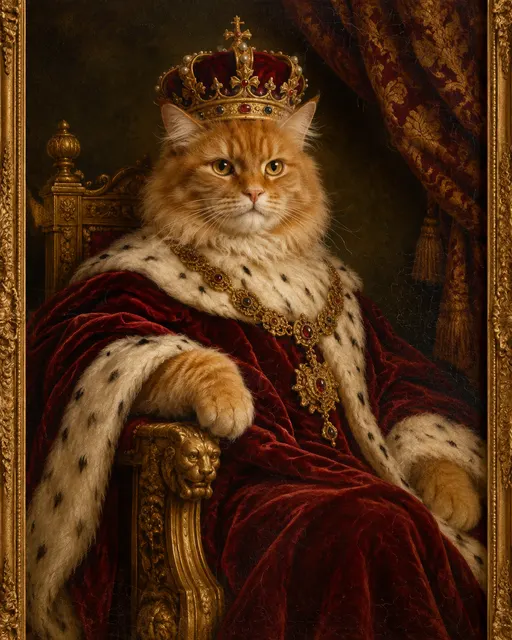
The royal pet portrait generator on AIPetGen is the Royal Portrait style on the AI pet portrait generator. You upload a photo of your dog or cat, select Royal Portrait, and generate. The style adds elegant historical clothing and a dramatic painted background while the generator is still instructed to use your pet as the subject.
If you leave the prompt empty, the page uses this default: “Create a classic royal portrait of my pet wearing elegant historical clothing with a dramatic painted background, based on the uploaded photo.” You can replace that sentence with a crown, a specific century, or a throne, and the style prefix still stays in front.
How to make a royal pet portrait on AIPetGen
1. Sign in and open the portrait tool
Royal Portrait lives on the portrait generator, not as a separate URL. Sign in first. Guests cannot generate.
2. Upload a clear face
Use a JPG, PNG, or WebP with both eyes visible. Royal clothing and a painted backdrop take space in the frame, so a tight, blurry crop leaves less of the real face to keep.
3. Select Royal Portrait
The six styles on that page are Realistic, Watercolor, Oil Painting, Cartoon, Anime, and Royal Portrait. Tapping Royal Portrait fills the default court-portrait instruction.
4. Keep or edit the prompt
Leave the default if you want clothing and a painted backdrop without naming a period. Add a crown, ermine, a gold frame, or “seated on a carved throne” if you want a tighter scene.
5. Generate at 1K, or pay for 2K and 4K
The first 1K image of the day is free after you sign in. 2K and 4K use credits. Another royal portrait the same day also uses credits if the account has them.
Create a free pet portraitSelect Royal Portrait after you upload the photo.
Prompt lines that fit this style
Short, concrete clothing and background notes work better than a list of moods. The style already asks for historical clothing and a painted backdrop. Name one garment and one setting.
Create a classic royal portrait of my cat wearing a gold crown and a crimson robe, seated on a carved throne, based on the uploaded photo.
Create a royal portrait of my dog in a white lace ruff and pearl collar, palace interior with a marble column, based on the uploaded photo.
Create a royal portrait of my pet as a Renaissance monarch with a jeweled gold chain, dark brocade curtain behind it, based on the uploaded photo.
Fur, markings, and expression can shift more in Royal Portrait than in Realistic or Watercolor, because the style adds clothing and a drawn court look. AIPetGen does not guarantee a perfect likeness. A well-lit face still gives the model more to follow.
Royal Portrait vs Classic Art templates
Royal Portrait on the generator page is one of six portrait styles. It is the royal pet portrait generator for a head-and-shoulders court picture from your photo.
Classic Art and Royal Portraits on [Home Create](/) is a template set with longer scenes: Renaissance King, Renaissance Queen, Field Marshal, Victorian Gentleman, and others. Those prompts name thrones, medals, libraries, and frames. Use them when you want a full costume tableau. Use Royal Portrait when you want the short path and the daily free 1K portrait.
FAQ
Where is the royal pet portrait generator?
On the AI pet portrait generator. Choose the Royal Portrait style after you upload a photo. There is no separate royal URL.
Does royal style still use my pet’s face?
The generator is instructed to base the portrait on your photo. Clothing and a painted backdrop are added on top. Likeness can still drift. A clear, well-lit face helps.
Can I get a royal portrait with the free daily image?
Yes. Royal Portrait uses the same 1 free 1K generation per account per day. 2K and 4K use credits.