










































How to Make a Free AI Pet Portrait
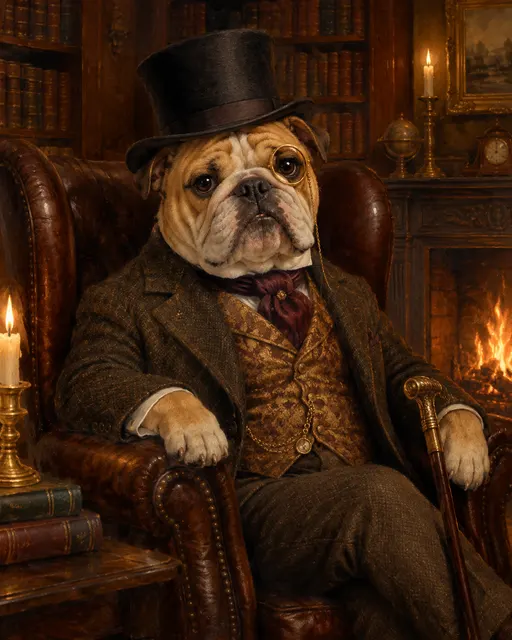
On AIPetGen you can make a free AI pet portrait in one sitting: sign in, open the AI pet portrait generator, upload a JPG, PNG, or WebP of your dog or cat, pick a style, and select Generate Free. Each account gets 1 free 1K image per day. That allowance resets at midnight UTC. 2K and 4K always use credits.
This page is a pet portrait generator free for that daily 1K image. AI pet photos free means the same allowance on the same tool, not a second product. Guests cannot generate. Create another portrait the same day only if the account has credits.
How to use the free pet portrait generator
The portrait tool keeps the path short. You stay on one page, start from a photo you already have, and download a new image. A prompt is optional. If you leave it empty, generation still runs from the selected style and your upload. AIPetGen does not print the file. For line art you print at home, turn a photo into a coloring page.
1. Sign in
Open AIPetGen and sign in. Image generation needs an account. There is no guest quota.
2. Open the portrait generator
Go to the AI pet portrait generator. That page is the short path when you only want a portrait. Home Create is for scenes, characters, and longer prompts.
3. Upload a pet photo
Add a JPG, PNG, or WebP. The generator is instructed to use that animal as the subject, not a stock dog or cat.
4. Choose a style
Realistic is selected by default. You can switch to Watercolor, Oil Painting, Cartoon, Anime, or Royal Portrait. Royal Portrait has its own walkthrough in Royal pet portrait generator.
5. Generate Free
Select Generate Free. Today's free generation covers the default 1K size. After the image appears, use Download. The original file on your device is left alone.
What free covers on AIPetGen
Free here is a daily 1K portrait, not an open tab you can run all afternoon. The portrait page states this in the generator itself. Unused days do not stack.
Daily free portrait rules on AIPetGen
| Case | What happens |
|---|---|
| First 1K portrait of the day | Uses the free allowance after you sign in |
| Another portrait the same day | Uses credits if the account has them |
| 2K or 4K | Uses credits, even if today's 1K is still unused |
| Reset | Midnight UTC. Unused days do not carry over |
| Video on Animate | Always uses credits. There is no free video tier |
| Prints and shipping | AIPetGen does not print or ship posters |
Credit packs and the rest of the billing rules sit on Pricing. Credits work only on this site. They are not cash, and they cannot be transferred.
Photos that make a better free AI pet portrait
The model follows the upload. A sharp face in the middle of the frame gives it more fur, eye shape, and markings to keep. A dark, cropped, or motion-blurred shot leaves more of the face for the model to invent.
Use daylight or a soft lamp. A strong flash that washes out fur is harder to follow.
Keep both eyes visible when you can, plus a little space around the ears and whiskers.
Put the pet near the center. If a person fills half the frame, say in the prompt which subject you want.
Prefer a larger original file over a tiny preview saved from a chat app.
Skip heavy filters. The generator already changes style; a filtered source hides the real markings.
Results still vary from attempt to attempt. AIPetGen does not guarantee a perfect likeness. Cartoon, anime, and royal styles add a drawn look or clothing, so fur and expression can shift more than they do in Realistic or Watercolor.
FAQ
Is there a pet portrait generator free on AIPetGen?
Yes. The AI pet portrait generator gives each signed-in account 1 free 1K image per day. Sign in, upload a pet photo, pick a style, and select Generate Free.
Are AI pet photos free on a separate tool?
No. AI pet photos free is the same daily 1K allowance on the portrait generator. You upload a photo and download a new portrait. There is no second free-photo URL.
Can I make more than one free portrait today?
The free allowance is 1 image per day at 1K. Another portrait the same day uses credits if the account has them. The next free generation is available after midnight UTC.
Do I need a prompt?
No. A prompt is optional. If you leave it empty, generation still runs from the selected style and your photo.
Create a free pet portrait1 free 1K portrait per account per day after you sign in.